
Introduction to Draw.io
Estimated duration: 5 minutes
Learning objectives:
After completing this reading, you will be able to:
Describe the core features of Draw.io, including the drag-and-drop interface, built-in templates, cloud integration, version control, multiformat file export, and customizable layout
Explain the use cases of Draw.io in UX design, focusing on features such as user flow creation, wireframing, journey mapping, and information architecture support diagrams
Explain how to get started with Draw.io, integrating with cloud storage for collaboration, and installing the desktop version for offline access
Introduction
Draw.io (officially known as diagram.net) is a free, browser-based diagramming tool for creating a wide range of visual content, including flowcharts, wireframes, UML diagrams, network maps, and organizational charts. It's widely used by UX designers, developers, educators, and project managers for its ease of use and flexibility. You can start using Draw.io without signing up, and it supports saving files directly to your local device, Google Drive, OneDrive, or Dropbox.
Key features of Draw.io
Drag-and-drop interface for shapes, arrows, icons, and text
Built-in templates for flowcharts, ER diagrams, UML, and wireframes
Offline mode available via the desktop version
Cloud integrations with Google Drive, OneDrive, Dropbox, GitHub, and more
Version control when used with cloud storage
Multiformat export (PDF, PNG, SVG, XML)
Collaboration via shared files on Google Drive or other cloud platforms
Highly customizable layout, grid, themes, and libraries
Benefits of using Draw.io
Free to use with no hidden charges or limitations
No sign-up required for basic use
Lightweight and fast, even in browsers
Secure—you control where your files are stored
Cross-platform (web, desktop, cloud)
Ideal for both beginners and advanced users
Use cases of Draw.io, especially for UX Designers
Draw.io is a great tool for UX/UI professionals due to its visual clarity and ease of prototyping.
For UX Design, you can use it to:
Create user flows: Map out user navigation paths or actions within a product
Design low-fidelity wireframes: Use shape libraries to quickly layout screens or app ideas
Customer journey mapping: Visualize customer emotions, pain points, and touchpoints
Sitemaps and navigation structures: Plan website or app architecture
Information architecture diagrams: Show how content is grouped and accessed
Example use:
- A UX designer mapping a login flow can use Draw.io to quickly drag login screens, error states, and success states, connecting them with arrows and labels to show interactions.
What makes Draw.io particularly effective for UX designers, developers, and project managers is its:
Drag-and-drop interface
Template library
Cloud storage integration for collaborative access
No login requirement for casual use
Its intuitive layout and wide range of diagramming elements make it a practical tool for anyone looking to visualize systems or structures without needing expensive licenses or complex setups.
How to sign up or start using Draw.io (diagrams.net)
1. No sign-up needed for basic use
You can start using Draw.io immediately without creating an account:
Right-click and open https://www.draw.io or https://app.diagrams.net in a new tab.
Choose your preferred storage location, where you'd like to save your diagrams:
Google Drive
OneDrive
Dropbox
Your Device (Local Storage)

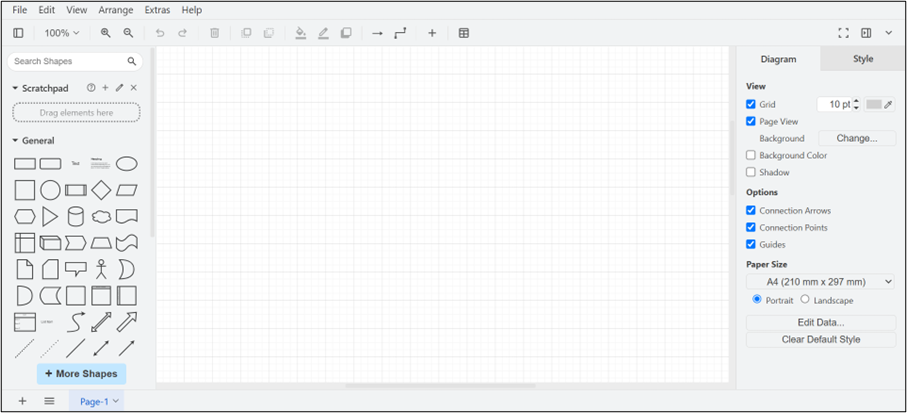
Once you've selected a storage location, you can begin drawing right away—no sign-up or email required.
2. Using Google or Microsoft Accounts for cloud storage and collaboration
To save and collaborate using cloud storage:
Choose Google Drive or OneDrive when prompted.
Authorize Draw.io to access your account.
Your diagrams will be automatically saved to your selected cloud storage.
You can later access or share your diagrams through platforms like Google Docs, Microsoft Teams, and more.
3. Downloading the Desktop version
You can also install the desktop version of Draw.io for offline use:
- Click the "Download" button on the Draw.io homepage.

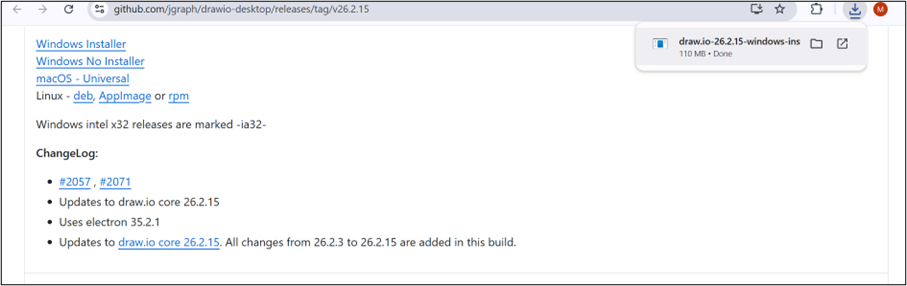
- You will be redirected to the GitHub release page for Draw.io Desktop (as shown in the screenshot).
On the GitHub page, choose the appropriate version for your operating system (for example, Windows, macOS, and Linux).
Download and install the application to start using it offline.
Bonus tip:
If you're using Draw.io for team collaboration, consider saving files to a shared Google Drive or Microsoft Teams folder for version control and easy access.